UCSF CALM Microscopy Wiki
UCSF CALM Microscopy Wiki
Wiki
Contents:
- Home
- Microscopes
- Spinning Disk Confocal
- TIRF/N-STORM
- Time Lapse
- 6D
- Crest LFOV/C2
- CSU-W1
- AZ100 Light Sheet
- OMX-SR
- TruLive3D Light Sheet
- C-Trap Optical Tweezers
- QLIPP Timelapse with Nanoindentor
- Snouty Light Sheet
- CVRI Nikon Spinning Disk 1
- CVRI Nikon Spinning Disk 2
- CVRI Leica SPE Confocal
- Other Equipment and Objectives
- Data Analysis Workstations
- Data Analysis
- Sample Preparation
- References & Education
- CALM Information
- Miscellaneous
Contents:
- Home
- Microscopes
- Spinning Disk Confocal
- TIRF/N-STORM
- Time Lapse
- 6D
- Crest LFOV/C2
- CSU-W1
- AZ100 Light Sheet
- OMX-SR
- TruLive3D Light Sheet
- C-Trap Optical Tweezers
- QLIPP Timelapse with Nanoindentor
- Snouty Light Sheet
- CVRI Nikon Spinning Disk 1
- CVRI Nikon Spinning Disk 2
- CVRI Leica SPE Confocal
- Other Equipment and Objectives
- Data Analysis Workstations
- Data Analysis
- Sample Preparation
- References & Education
- CALM Information
- Miscellaneous
iLab
Reservation calendars
The reservation calendars for all the microscopes are on iLab. Visit the iLab landing page for equipment here (you will need to log into iLab)
Setting up an Account
If you don’t have an iLab account detailed directions for setting up an account can be found on the RRP website. The basic steps for setting up a new account are as follows:
- Create your iLab Account at https://ucsf.ilab.agilent.com
- Request to be added to your PI
- Ask your PI to assign you to funding sources (This step has to be done by the PI or someone assigned as a Lab Manager)
- The directions for assigning speedtypes are on the RRP website (https://rrp.ucsf.edu/managing-lab) and the changes are made immediately.
The calendars are restricted to trained users and access is granted after a training session.
Reasons why filling out the training request fails
-
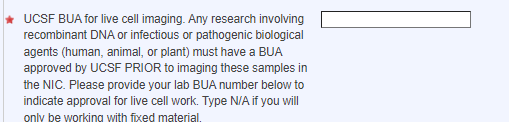
BUA
- One of the starred regions is not filled out (most often the BUA)
-
The form has not been saved
- If the is not complete or hasn't been fully saved, it will appear red
- To Fix: open up the form and go to the bottom of the form and click "save completed form"

-
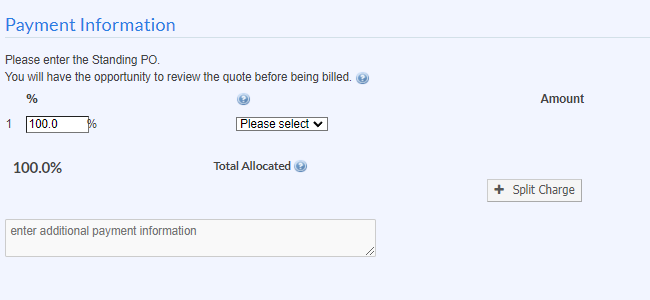
No Payment information/No speedtype
- The cost is 0, but you still need to select the speed type you would
like to use under payment information.
- To Fix: Ask your PI to assign you to funding sources (This step has to be done by the PI or someone assigned as a Lab Manager)
- The directions for assigning speedtypes are on the RRP website (https://rrp.ucsf.edu/managing-lab) and the changes are made immediately.
- Note: For any fee that will be added we will discuss with you before adding or applying
- The cost is 0, but you still need to select the speed type you would
like to use under payment information.
-
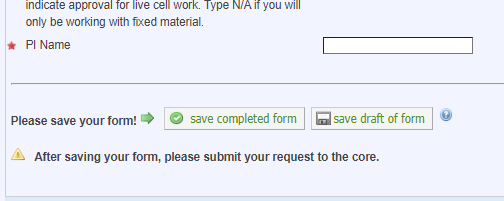
The form was saved, but the request at the bottom was not clicked
- There are two different save buttons. Please remember to click the “Save” on the Form and the submit request to core at the bottom!
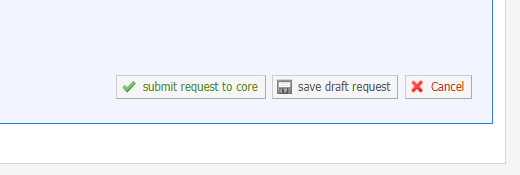
To get back into your request to check
- You can go back in to your request in iLab and check for all of these things by clicking on the blue arrow next to the request.

-
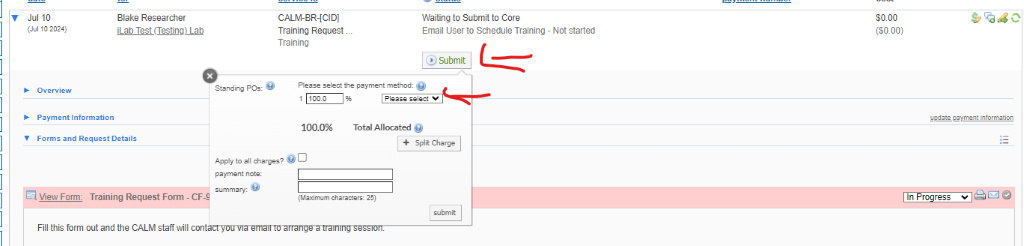
You had to go back and now the submit button needs to be clicked
- If this is the case you will need to click the “submit” button in line with your request. It will ask you to reselect/check the selection of the speed type and click submit again in this window.