
UCSF CALM Microscopy Wiki
UCSF CALM Microscopy Wiki
Wiki
Contents:
- Home
- Microscopes
- Spinning Disk Confocal
- TIRF/N-STORM
- Time Lapse
- 6D
- Crest LFOV/C2
- CSU-W1
- AZ100 Light Sheet
- OMX-SR
- TruLive3D Light Sheet
- C-Trap Optical Tweezers
- QLIPP Timelapse with Nanoindentor
- Snouty Light Sheet
- CVRI Nikon Spinning Disk 1
- CVRI Nikon Spinning Disk 2
- CVRI Leica SPE Confocal
- Other Equipment and Objectives
- Data Analysis Workstations
- Data Analysis
- Sample Preparation
- References & Education
- CALM Information
- Miscellaneous
Contents:
- Home
- Microscopes
- Spinning Disk Confocal
- TIRF/N-STORM
- Time Lapse
- 6D
- Crest LFOV/C2
- CSU-W1
- AZ100 Light Sheet
- OMX-SR
- TruLive3D Light Sheet
- C-Trap Optical Tweezers
- QLIPP Timelapse with Nanoindentor
- Snouty Light Sheet
- CVRI Nikon Spinning Disk 1
- CVRI Nikon Spinning Disk 2
- CVRI Leica SPE Confocal
- Other Equipment and Objectives
- Data Analysis Workstations
- Data Analysis
- Sample Preparation
- References & Education
- CALM Information
- Miscellaneous
OMX-SR
FPBASE
Optics
Objectives
| Position | Objective | Pixel Size |
|---|---|---|
| 1. | Plan ApoN 60x/1.42 | |
| 2. | TIRF Apo 60x/1.49 |
Cameras and Emission Filters
3 x liquid cooled [pco.edge 5.5 sCMOS cameras]
- Camera 1: DAPI: 435/31 Cy5: 683/40 DIC
- Camera 2: A488: 528/48
- Camera 3: A568: 609/37
Lasers
- 405 nm
- 488 nm
- 568 nm
- 640 nm
Sample holder compatibility
- Standard microscope slides
- 35 mm glass bottom dishes
- Multiwell chambered coverslips
Interface Requirements
PC
- Linux Centos 6.8
- Kernel Linux 2.6.32-642.13.1.e16x86_64
- GNOME 2.28.2
- Intel Core i7 2600 CPU
- NVidia NVS300
- Drives 1 TB SATA boot drive
RAID 3 × 1 TB SATA in RAID5 configuration
Notes on usage:
SIM imaging is extremely sensitive to spherical aberration. To get the highest quality images you need to minimize spherical aberration. This means:
-
You should use high precision 0.17 mm coverslips
- You should mount only a single coverslip in the center of the slide.
-
You should mount in an appropriate mounting medium. Fixed samples should be mounted in high refractive index mounting media with antifade. Be aware that hard-set mounting medium can cause shrinkage when it cures. We also recommend that you do not use mounting medium which contains DAPI or other fluorophores.
-
You should have your sample as close to the coverslip as possible (e.g. cells grown on coverslip not on slide).
- You should use bright and stable fluorophores.
- You should select the correct immersion oil for you sample. You can use the GE immersion oil calculator to determine the best oil to start with. The also have the calculator as a phone app.
As a general rule, if the sample doesn't look good in widefield or confocal, SIM imaging will not improve it. You should make every attempt to optimize your staining and reduce background from out-of-focus fluorescence for the best results.
Effect of mounting media on sample:
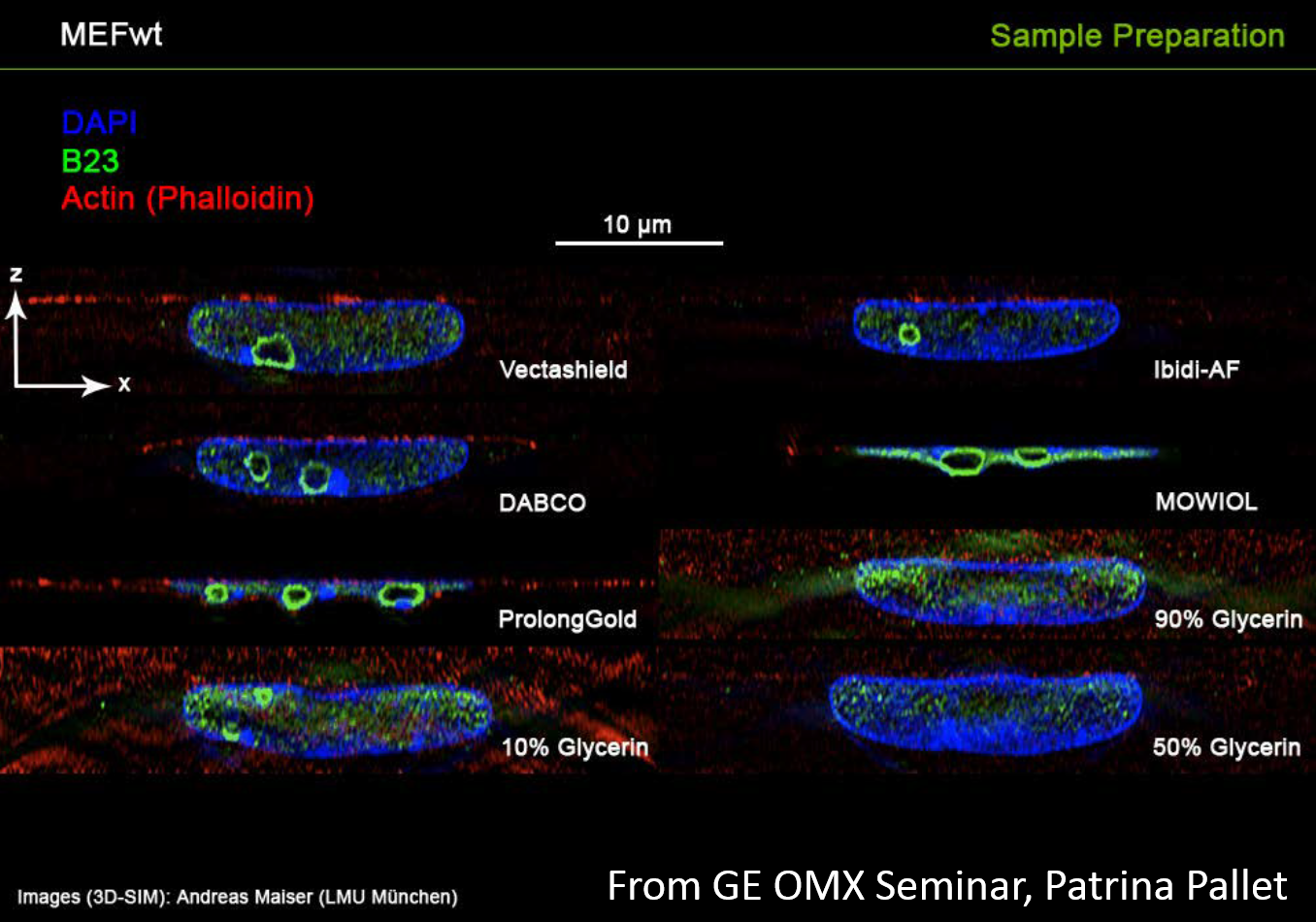 mountingmedia-effect-on-sample
Oil Effect on beads:
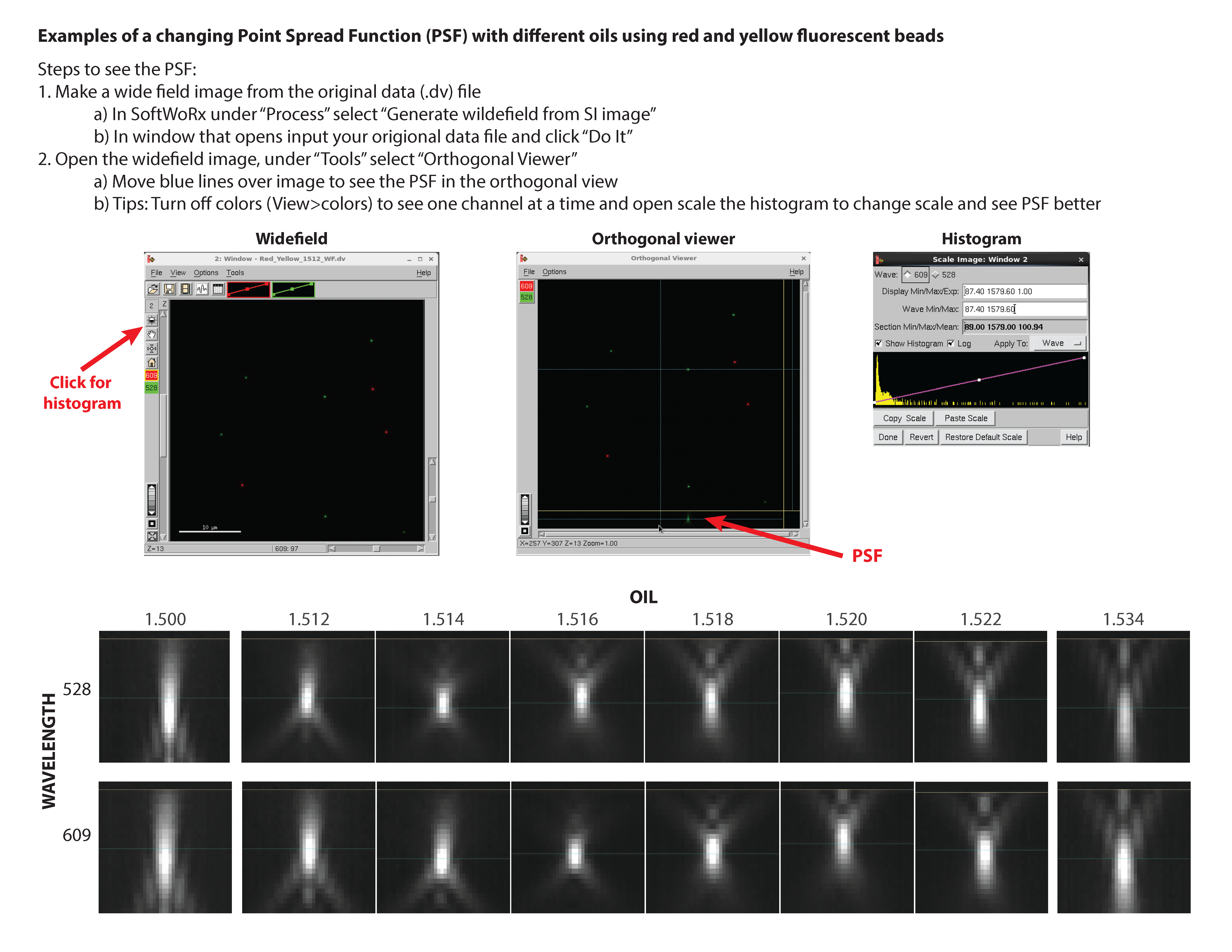 OMX_PSF_oil_test_with_beads
Documentation
Application Guides
📄 Oil Optimization Application Guide
Quick Reference Guides
📄 DLM Acquisition Quick Reference
📄 DLM Analysis Quick Reference
📄 OMX-SR Acquisition Quick Reference
📄 OMX-SR Reconstruction Quick Reference
System Information
📄 OMX-SR System Information
📄 OMX-SR E-Controller
📄 Ultimate Focus
📄 Ring TIRF
Imaging Techniques
📄 Image Registration
📄 Localization
📄 PhotoKinetics
📄 PhotoKinetics (PK)
📄 FRAP Product Note
SIM Artifacts & Troubleshooting
📄 Common SIM Artifacts (2016)
Getting your Data off the OMX!
- Can I use Box/drop box?
- NO-As the OMX has gotten older, the Oporating system is nolonger compatible with versions of browswers that can run box and drop box
- How does my hard drive need to be formatted?
- FAT32 or NTFS. These are the ONLY 2 that will work
- Please Note FAT 32 can not handle file sizes larger than 4GB
- NTFS has limited Read-only capabilities on Mac.