
UCSF CALM Microscopy Wiki
UCSF CALM Microscopy Wiki
Wiki
Contents:
- Home
- Microscopes
- Spinning Disk Confocal
- TIRF/N-STORM
- Time Lapse
- 6D
- Crest LFOV/C2
- CSU-W1
- AZ100 Light Sheet
- OMX-SR
- TruLive3D Light Sheet
- C-Trap Optical Tweezers
- QLIPP Timelapse with Nanoindentor
- Snouty Light Sheet
- CVRI Nikon Spinning Disk 1
- CVRI Nikon Spinning Disk 2
- CVRI Leica SPE Confocal
- Other Equipment and Objectives
- Data Analysis Workstations
- Data Analysis
- Sample Preparation
- References & Education
- CALM Information
- Miscellaneous
Contents:
- Home
- Microscopes
- Spinning Disk Confocal
- TIRF/N-STORM
- Time Lapse
- 6D
- Crest LFOV/C2
- CSU-W1
- AZ100 Light Sheet
- OMX-SR
- TruLive3D Light Sheet
- C-Trap Optical Tweezers
- QLIPP Timelapse with Nanoindentor
- Snouty Light Sheet
- CVRI Nikon Spinning Disk 1
- CVRI Nikon Spinning Disk 2
- CVRI Leica SPE Confocal
- Other Equipment and Objectives
- Data Analysis Workstations
- Data Analysis
- Sample Preparation
- References & Education
- CALM Information
- Miscellaneous
CSU-W1 Spinning Disk/High Speed Widefield
FPBASE
Objectives
| Objective | Zyla nm/pixel | EMCCD HighRes nm/pixel | EMCCD LOV nm/pixel |
|---|---|---|---|
| 1. Plan Apo λ 10x / 0.45 | 649.3 | 667.1 | 1029 |
| 2. Plan Apo λ 20x / 0.75 | 325.1 | 334.1 | 649.2 |
| 3. Apo LWD 40x / 1.15 WI | 163.9 | 169.1 | 328.6 |
| 4. Plan Flour 60x / 1.3 Oil | 108.3 | 111.9 | 328.6 |
| 5. Plan Apo VC 60x / 1.4 Oil | 108.3 | 111.9 | 217.5 |
| 6. Apo TIRF 100x / 1.49 Oil | 64.6 | 66.8 | 130.0 |
(only 10x and 20x are installed on Microscope; others are in cabinet)
Note: EMCCD “High Res” has a 2X magnifier to make it a simular pixel size as the Zyla
Filter Turret (top)
- Photobleaching / photactivation cube (has an OD2 excitation filter and a TB 355-405-473 dichroic mirror)
Filter Turret (bottom)
Emission Wheel (for Widefield)
- Open
- 440/521/607/700 Multipass
- 440/40
- 525/30
- 607/36
- 684/34
- 472/30
- 542/27
- 464/547 Multipass
Emission Wheel (for W1)
- 447/60
- 525/50
- 607/36
- 685/40
- 5FF01-835/70-25
- empty
- empty
- empty
- empty
- empty
Dichroics in the W1
- CSU-W1 Quad Dichroic 405/445/514/785
- CSU-W1 Penta Dichroic 405/488/561/640/755
Lasers
- 405 nm 100mW
- 488 nm 150 mW
- 561 100 mW
- 639 160mW
- 785 150mW
Hardware
- Andor Zyla 5.2 (Right Camera Port)
- Andor Zyla 4.2 (USB3, CSU-W1 left port)
- Andor iXon Ultra DU888 1k x 1k EMCCD (CSU-W1 back port)
- Nikon Ti with PFS3, Stage up with two turrets
- ASI XYZ stage (150 um travel piezo Z; COM8 Baud 115200)
- Lumencor Spectra-X (COM4, Baud 9600) with ESIO AOTF controller (COM5, Baud 57600)
- Sutter Emission Wheel and Lambda 10-B controller (COM9, Baud 128000)
- Sutter TLED, White
- Rapp Optoelectronic UGA-40 photobleaching system (COM6)
- Vortran 405 and 473 nm lasers for photoactivation and photobleaching
- Arduino (BF shutter/Zoom encoder; COM3)
- W1 Spinning Disk with Borealis upgrade (Left Camera Port; COM7, Baud 115200)
- Vortran VersaLase (8) - 5 line laser launch (405-100, 488-150, 561-100, 639-160 and 785-150 installed, MM 50μm core with 2m fiber and FC/PC output)
- TriggerScope (COM10)
Hardware Documentation
📄 Triggering a Device from Multiple Cameras (Arduino Setup)
📄 Interlocking Multiple Devices on a Microscope
📄 BNC Breakout Board Images
📄 BNC Breakout Board Wiring Diagram
Firmware / Software
- Ti firmware v5.0 (Combination N)
- Ti Driver v2.0.5.1
- TiControl v4.4.1
- Micro Manager 2.0 (how to cite Micro Manager: https://micro-manager.org/Citing_Micro-Manager)
- Current build Nightly build: 2025-06-10
PC
- Asus Prime X299-A
- Windows 10 64-bit
- Core i9 3.3GHz
- 64 GB RAM
- NVidia GeForce RTX2080
- Samsung 970 EVO Plus 2000Gb M.2 NVMe x 4 22x80 SSD (Fast Data)
-
HGST 0F27452 DC HC510 ISE 10,000gb 7200rpm 256mb Cache SATA 6.0Gb/s (Data)
- Micron 5300 PRO 960gb SSD
Photobleaching
Open the Projector plugin in Micro-mananger to control the photobleaching system. Instructions on using the Projector plugin are here. To control the laser powers, open the Vortran control panel. To calibrate either laser, you can use an 0.01 mg/ml fluorescein solution, imaged in the FITC channel. A bottle of this solution is in the cabinet. Right now there is no way to save the calibration, so if you switch lasers you'll need to recalibrate.
For photoconverting mEos2, using the correct laser power is critical. If the laser power is too high, the protein will bleach instead of photoconverting. With the current OD2 filter, a 405 nm power of 50 mW works well (once we switch to an OD1 filter, use 5 mW). The Rapp unit ignores the spot dwell time parameter; to control how long the area is converted, adjust the loop parameter. For the laser power above, 10 loops gives good photoconversion and is still relatively rapid (~1s for areas of a few μm^2^ at 100x). For bleaching GFP you'll need to use higher power.
Laser powers measured out of 10x objective, each laser at 50 mW power (no ND filter in)
Quickstart Guide
📄 FRAP Guide
Power Measurements
Most recent measurement: 2026-08-06 15:05
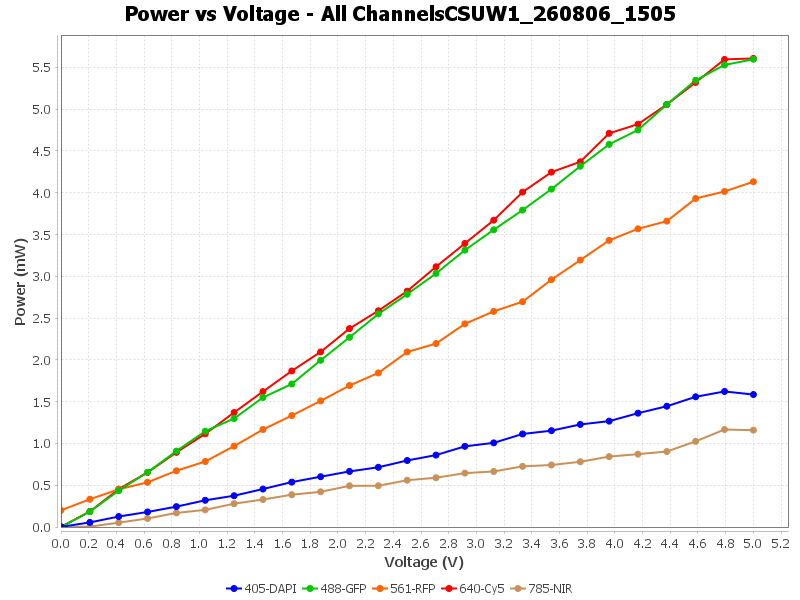
Browse measurements:
Maximum power over time
Power at the highest voltage of each sweep, per channel.
