
UCSF CALM Microscopy Wiki
UCSF CALM Microscopy Wiki
Wiki
Contents:
- Home
- Microscopes
- Spinning Disk Confocal
- TIRF/N-STORM
- Time Lapse
- 6D
- Crest LFOV/C2
- CSU-W1
- AZ100 Light Sheet
- OMX-SR
- TruLive3D Light Sheet
- C-Trap Optical Tweezers
- QLIPP Timelapse with Nanoindentor
- Snouty Light Sheet
- CVRI Nikon Spinning Disk 1
- CVRI Nikon Spinning Disk 2
- CVRI Leica SPE Confocal
- Other Equipment and Objectives
- Data Analysis Workstations
- Data Analysis
- Sample Preparation
- References & Education
- CALM Information
- Miscellaneous
Contents:
- Home
- Microscopes
- Spinning Disk Confocal
- TIRF/N-STORM
- Time Lapse
- 6D
- Crest LFOV/C2
- CSU-W1
- AZ100 Light Sheet
- OMX-SR
- TruLive3D Light Sheet
- C-Trap Optical Tweezers
- QLIPP Timelapse with Nanoindentor
- Snouty Light Sheet
- CVRI Nikon Spinning Disk 1
- CVRI Nikon Spinning Disk 2
- CVRI Leica SPE Confocal
- Other Equipment and Objectives
- Data Analysis Workstations
- Data Analysis
- Sample Preparation
- References & Education
- CALM Information
- Miscellaneous
C-Trap Optical Tweezers
About
The C-Trap is an easy to use optical trap made by Lumicks. Our current configuration has Microfluidics with two laser traps and confocal imaging. Specifics below:
Objectives
Nikon CFI Plan Apo 60 X/1.2 NA WI 270 WD
Condenser
Leica P, 60x, 1.40NA Oil 1.4NA WD
Lasers
Trapping laser: 1,064nm (20W at source)
Confocal Laser: 561nm only
Traps
One Dynamic Trap
One static
Micro Fluidics
Automatic Fluidics Control (AFL)
5 fluidic channels + Waste (6 total)
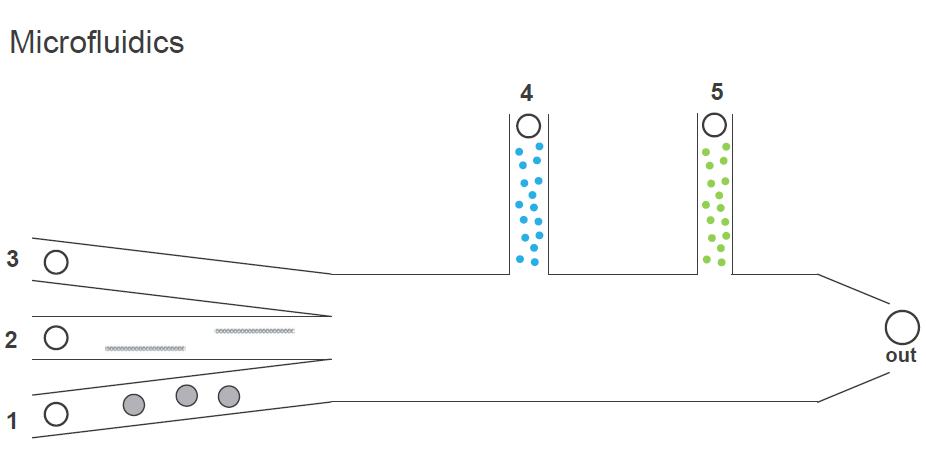 microfluidics
Data Analysis
For C-Trap data analysis instructions, see C-Trap Data Analysis
Manuals
Lumicks Manuals and documentation are only allowed to be shared internally per Lumicks guidlines. Please email the Core if you need access.
Troubleshooting Tips:
Trapping laser won't turn on
- If the system has not been used in a few days or more than the lasers may need some time to warm up!
- Tip: always turn the key first while you set up to give them as much time as possible
- Wait an extra few minutes (5-10min) if you did not turn it on first thing.
- Do a full restart
Condenser won't move
- It is likely stuck in a state. The whole system needs to be restarted.
Whole system restart
- Lower the Objective
- Turn off the system computer
- Turn off software first. Save anything you do not want to get lost.
- Turn off from Windows Start menu
- Bridge computer can stay on
- Turn off Trapping laser
- Turn Key
- Turn off Main power Supply
- WAIT 3 min (set a timer if needed)
- Turn on main power supply
- A high-pitched noise is normal as a few of the components will reset to default "home positions"
- Turn on the system computer
- This is the box below the main power supply,
- There is a door with a key, you need to open the door then flip the switch
- Turn on the trapping laser