UCSF CALM Microscopy Wiki
UCSF CALM Microscopy Wiki
Wiki
Contents:
- Home
- Microscopes
- Spinning Disk Confocal
- TIRF/N-STORM
- Time Lapse
- 6D
- Crest LFOV/C2
- CSU-W1
- AZ100 Light Sheet
- OMX-SR
- TruLive3D Light Sheet
- C-Trap Optical Tweezers
- QLIPP Timelapse with Nanoindentor
- Snouty Light Sheet
- CVRI Nikon Spinning Disk 1
- CVRI Nikon Spinning Disk 2
- CVRI Leica SPE Confocal
- Other Equipment and Objectives
- Data Analysis Workstations
- Data Analysis
- Sample Preparation
- References & Education
- CALM Information
- Miscellaneous
Contents:
- Home
- Microscopes
- Spinning Disk Confocal
- TIRF/N-STORM
- Time Lapse
- 6D
- Crest LFOV/C2
- CSU-W1
- AZ100 Light Sheet
- OMX-SR
- TruLive3D Light Sheet
- C-Trap Optical Tweezers
- QLIPP Timelapse with Nanoindentor
- Snouty Light Sheet
- CVRI Nikon Spinning Disk 1
- CVRI Nikon Spinning Disk 2
- CVRI Leica SPE Confocal
- Other Equipment and Objectives
- Data Analysis Workstations
- Data Analysis
- Sample Preparation
- References & Education
- CALM Information
- Miscellaneous
Add a scale bar in Fiji
Prereqresite:
- Download and install Fiji
- Have an image with Metadata
-
Whould be an.ome.tif,.nd2, or.dv
- Step 1: Open your Image in Fiji by first opening the Bioformats shortcut window
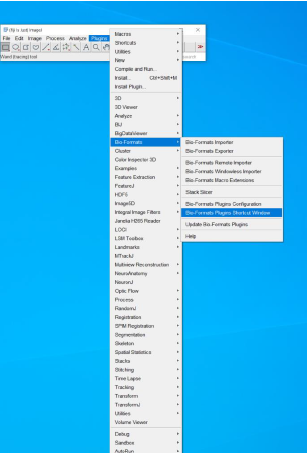
- Step2: Drag and drop your file on the shortcut window
*Or you can open from Bio Format Importer
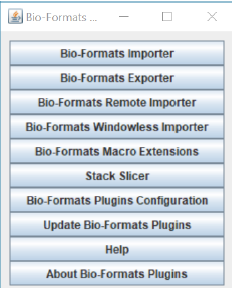
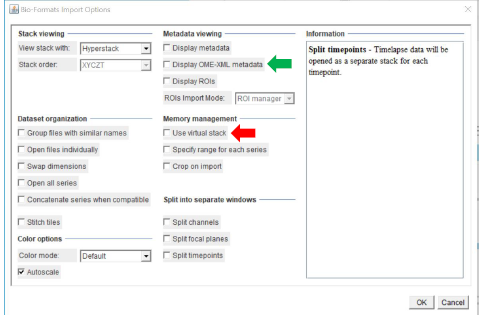
- Step3: Click ‘OK’ from the window below
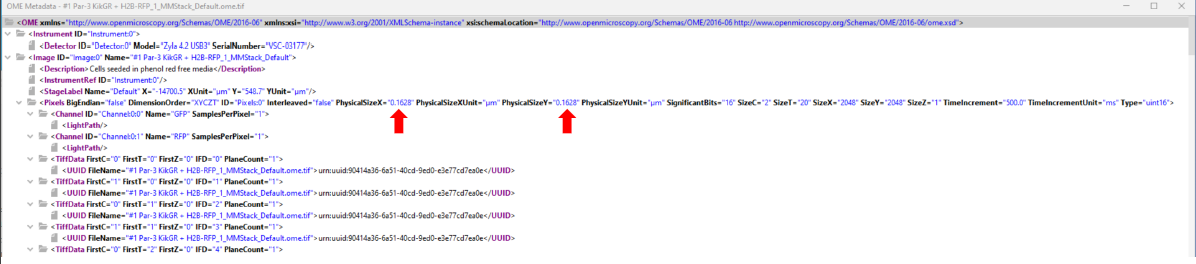
*‘Display OME XML metadata’ will show you the pixel size embedded in the image if you want to double-check that you have pixel sizes that are correct/make sense
*‘Use virtual stack’ (red arrow) will help with opening up large-sized z stack images faster!
- Step 4: Optional check pixel size, this is an example image showing pixel size area with red arrows
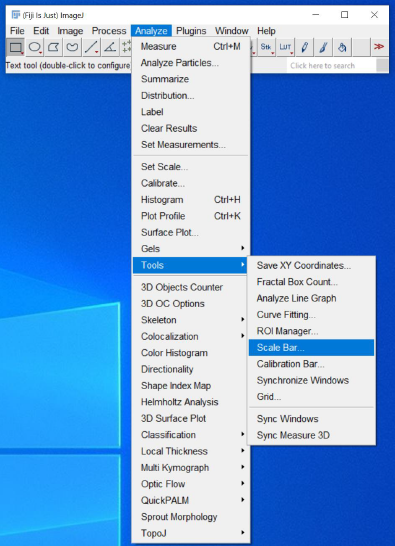
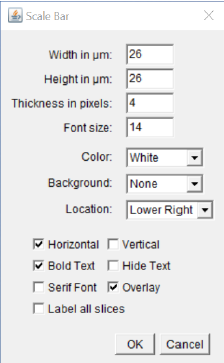
- After checking the pixel size, you can add the scale bar from the
menu
Analyze > Tools > Scale bar
*Please make a copy and put the scale bar on the copy of the image, since it can be an irreversible process.