UCSF CALM Microscopy Wiki
UCSF CALM Microscopy Wiki
Wiki
Contents:
- Home
- Microscopes
- Spinning Disk Confocal
- TIRF/N-STORM
- Time Lapse
- 6D
- Crest LFOV/C2
- CSU-W1
- AZ100 Light Sheet
- OMX-SR
- TruLive3D Light Sheet
- C-Trap Optical Tweezers
- QLIPP Timelapse with Nanoindentor
- Snouty Light Sheet
- CVRI Nikon Spinning Disk 1
- CVRI Nikon Spinning Disk 2
- CVRI Leica SPE Confocal
- Other Equipment and Objectives
- Data Analysis Workstations
- Data Analysis
- Sample Preparation
- References & Education
- CALM Information
- Miscellaneous
Contents:
- Home
- Microscopes
- Spinning Disk Confocal
- TIRF/N-STORM
- Time Lapse
- 6D
- Crest LFOV/C2
- CSU-W1
- AZ100 Light Sheet
- OMX-SR
- TruLive3D Light Sheet
- C-Trap Optical Tweezers
- QLIPP Timelapse with Nanoindentor
- Snouty Light Sheet
- CVRI Nikon Spinning Disk 1
- CVRI Nikon Spinning Disk 2
- CVRI Leica SPE Confocal
- Other Equipment and Objectives
- Data Analysis Workstations
- Data Analysis
- Sample Preparation
- References & Education
- CALM Information
- Miscellaneous
Finding your pixel size
As long as you have your raw data and it was taken in the CALM it should be a.ome.tif,.nd2, or.dv file. These steps below will also work with any file as long as the metadata has properly been recorded.
Prerequisite: Download and open fiji (https://fiji.sc/)
- Step1: Open the Bio-Format Plugins Shortcut Window
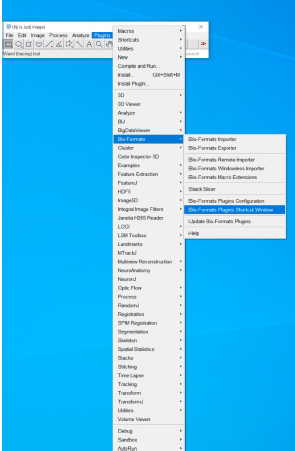
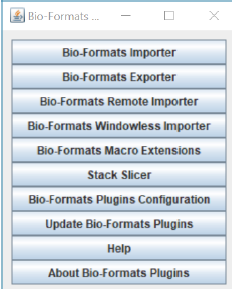
- Step2: Drag and drop your file on the shortcut window
*Or you can open from Bio-Format Importer
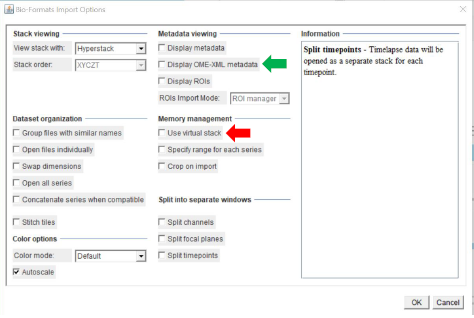
- Step3: Click ‘OK’ from the window below
*‘Display OME XML metadata’ will show you the pixel
size embedded in the image
*‘Use virtual stack’ (red arrow) will help with opening
up large sized z stack images faster!
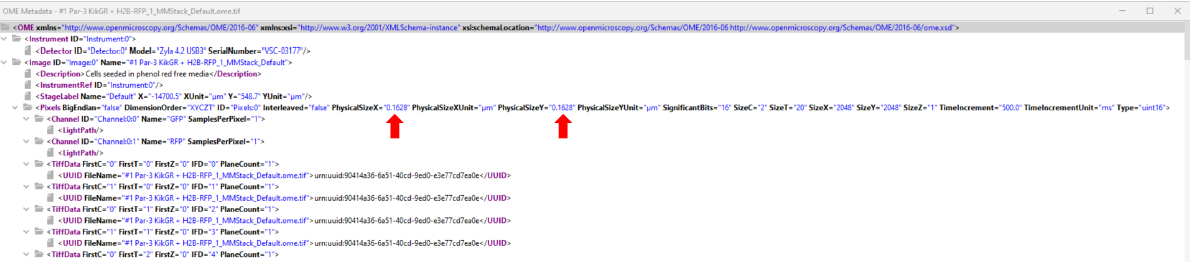
- In the OME Metadata window
- You can double check the pixel size from this window (red arrow)
*This is just an example screenshot